
Overview
Hen depreciation list screen is used for managing daily hen depreciation.
It can be accessed from hen depreciation main menu
Add a New Hen Depreciation
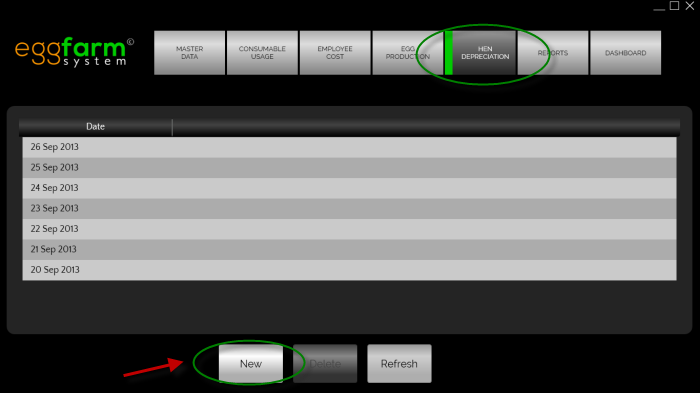 To add a new hen depreciation data, you will need to press the "New" button in hen depreciation list screen.
You will enter hen depreciation entry screen after that.
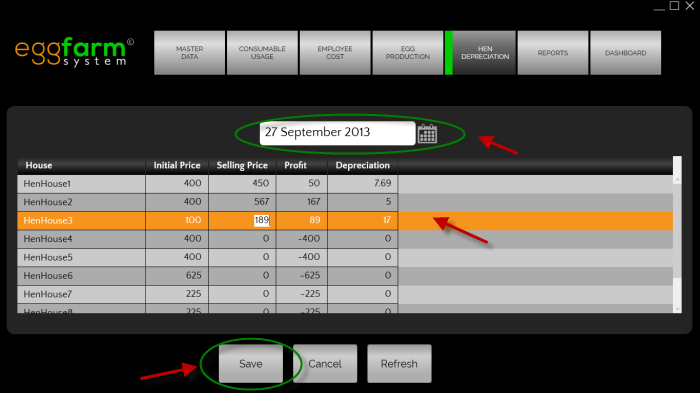 The hen depreciation entry consists of several important fields:
-
Date
The date field is represented by a date picker in the middle. Bear in mind that there could only be 1 date for every egg production entry. -
Hen House
The hen house. -
Initial Price
Hen initial value. -
Selling Price
Hen sold price. -
Profit
Profit for selling hen. -
Depreciation
Hen depreciation value.
To add entry of hen depreciation, pick the date and fill the selling price of each hen house.Once it's complete press the "Save" button.
Edit Hen Depreciation Entry
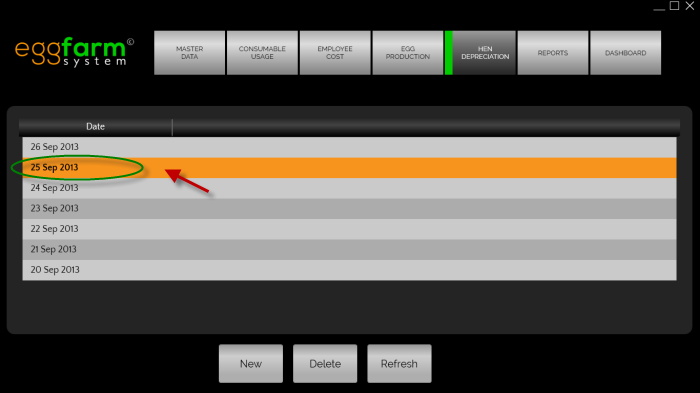 To edit a hen depreciation data, you will need to be in hen depreciation list screen.
Just double click the corresponding hen depreciation data to continue to hen depreciation entry screen.
Delete Hen Depreciation Entry
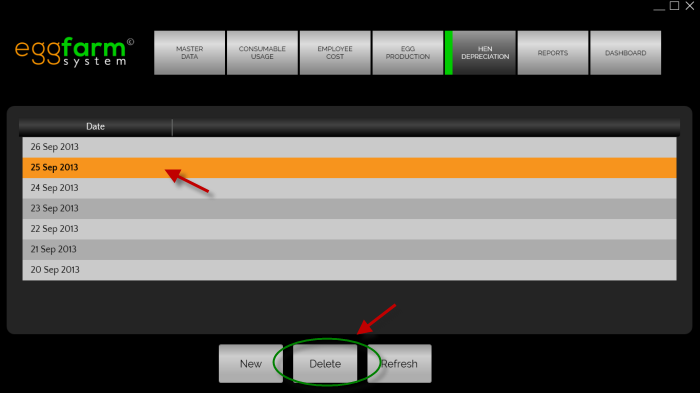 To delete a hen depreciation data, you will need to be in hen depreciation list screen.
You will need to select the hen depreciation data from the list, then press the "Delete" button.